Context, Not Just Search.

Enabling contextual information within users workflow via Quickread to helps reduce information search time and cognitive load for enterprise users
At Whatfix: Learn, evolve, own, grow

Driving the effort to understand tne need for improving search quality of Quickread, thereby reframing the challenge from a search quality issue to delivering contextual information within users’ flow of work, ultimately designing an AI system that supports enterprise users with relevant, in-context assistance, ensuring intuitiveness and scalability.

A key highlight throughout this work of around 3 quarters was defining the solution direction from a standalone feature into an omnipresent experience embedded within users’ applications. This shift required thoughtful collaboration across engineering, product and business leadership, aligning on a direction that balanced immediate usability with long-term scalability.

For readers, this case study has a product walkthrough upfront, followed by a deep dive into its details, nuances and decisions taken.

The snappy bits: Walkthrough of Quickread in motion

Designed to be read, not decoded

Breaking complex information into clean, glanceable pieces that reduce friction, lower mental fatigue and builds trust.

Omnipresent, not intrusive

Accessing information where and when needed on the flow of work.

Form follows function

Quickread works across legacy and modern applications, accessible directly within the users workflow, via in-app floating modals, HUB widget, or as Chrome extension, delivering enterprise knowledge without disruption.

Imagine being a user searching for an answer that directly impacts your work. You try a new AI-powered feature expecting clarity and confidence. Instead, you receive long, generic responses that don’t quite connect to your context. You hesitate. You question whether you can rely on it. The next time, you fall back to manual search - not because it’s faster, but because it feels safer.

From a business perspective, this creates a silent failure. The feature exists, users try it, but they don’t return. The investment is made, the capability is there, but the experience doesn’t build enough trust to become part of the user’s workflow.

And trust, once lost, is difficult to rebuild. Especially with AI, where reliability and relevance are not just helpful - they are essential.

The Reality of Information at Work

At first glance, the need seemed obvious - these users need information to do their jobs. Provide a powerful search tool, connect it to knowledge sources, and the problem should be solved. After all, how different could information needs really be across roles?

This assumption shaped our initial approach. We focused on improving retrieval quality, indexing more content, and making answers faster. On paper, the system worked. But adoption told a different story. Despite having access to information, employees continued relying on colleagues, switching between tools, or abandoning their search midway.

Our primary users are non-technical professionals across Sales, Support, Operations, HR, Finance, and Insurance teams who navigate multiple enterprise applications throughout their day. They are often mid-task, time-constrained, and focused on execution rather than exploration. When they seek information, it’s not out of curiosity, it’s because something is blocking progress. Switching tools, crafting precise queries, or deciphering dense documentation adds friction they cannot afford.

Understanding the Humans behind workflows

The gap wasn’t access - it was context. We had been designing for the system’s capabilities, not the user’s reality.

Through conversations with employees across sales, support, operations, and finance both internal and external, a pattern emerged. Their work was non-linear, with questions arising mid-task, tied to specific customers or decisions. Leaving their environment to search for answers didn’t just slow them down, it broke their momentum.

What they needed wasn’t another destination for information, but assistance that moved with them delivering relevant, trustworthy answers directly within their flow of work.

This shift reframed the challenge from improving search to enabling contextual assistance, laying the foundation for an AI system, built to integrate seamlessly into enterprise workflows.

Discovering the Real Problem : Beyond search

Through 30+ conversations with internal CSMs and end users, and by analysing behavioural patterns, productboard tickets, and recurring support themes, a deeper issue was uncovered - in how users accessed information within their workflows. Two core problems emerged.

#1 Information existed, but not in the flow of work

Users had access to knowledge bases, documentation, and search tools. But none of it was contextual.

  • Users had to leave their task.to search

  • Search queries required structure for best responses.

  • Information was dense and not progressive.

  • Responses were one-shot, not exploratory.

The result? High cognitive load, low trust, and poor adoption of knowledge tools including Quickread. QuickRead was being treated as a summarisation layer; what users needed was a decision support layer.

Image for reference

#2 The experience was transactional, not conversational

The existing system behaved like a single Q&A box: Ask - Get an answer - Start over.

But real workflows aren’t linear. Users refine, probe, compare, and validate before acting. There was complete lack of:

  • Information exploration

  • Information validation and transparency

  • Previous or repeat search query context

This reduced confidence and prevented repeated engagement.

Image for reference

Rethinking the experience: Beyond solving usability gaps, I realised something bigger.

If QuickRead remained a summarisation widget, it would compete with search. If it evolved into a contextual, agentic layer embedded in workflow, it could redefine how enterprise users consume knowledge. The opportunity wasn’t just faster answers.
 It was reducing the time between understanding context and taking confident action.

Reshaping Quickread: Addressing the challenges head on.

Form - Evolving Quickread into a flexible system of forms tailored to varying user needs, organisational contexts.and application code base

Interaction -focusing on in-context, on-demand assistance, especially in frequently used or high-friction areas, supported by conversational and suggestive follow-ups.

The Opportunity: From in search summary tool to workflow context

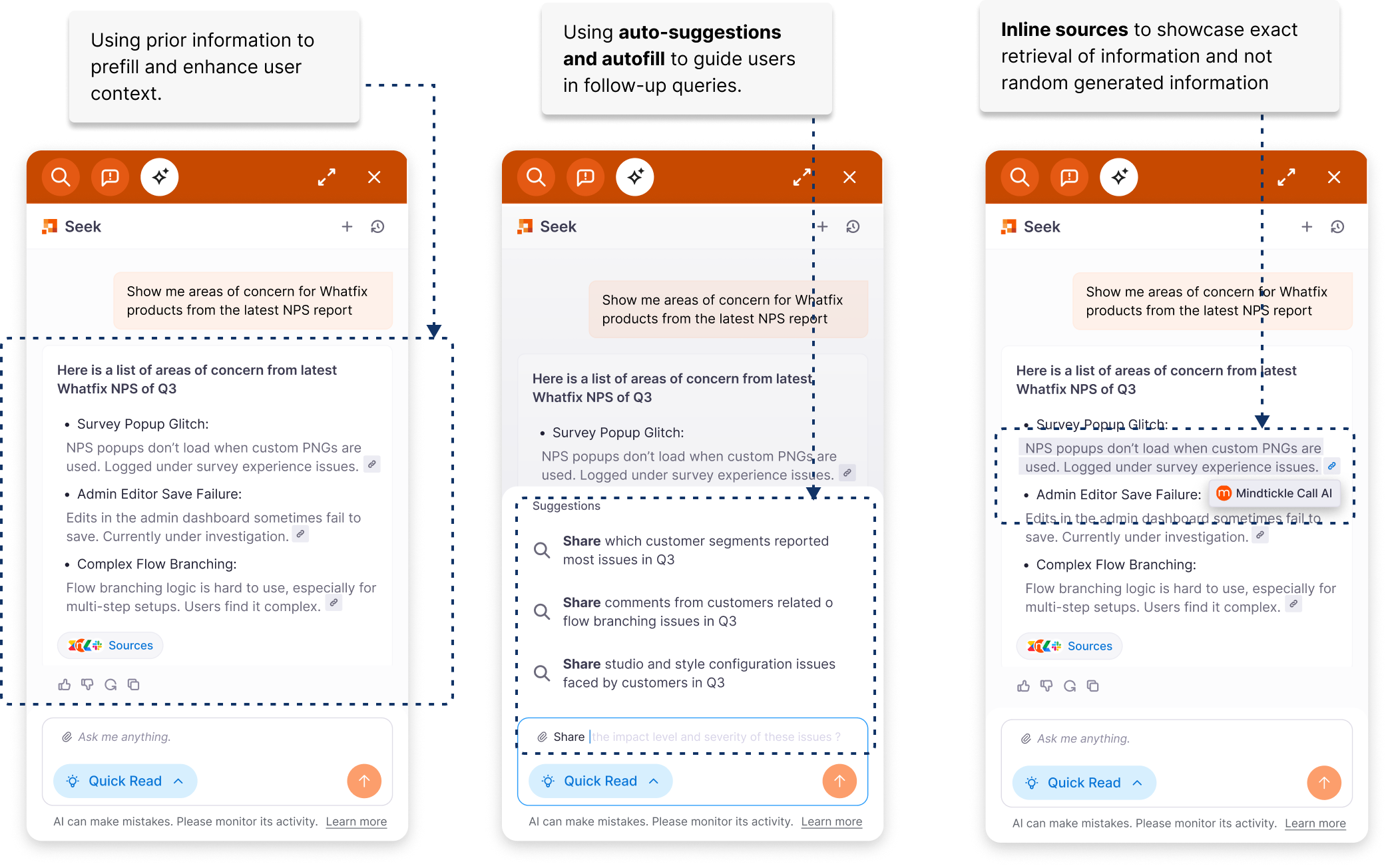
#1 Building context of work rather than depending just on query phrasing

  • The entry point resides on the app, in flow of work as well as on demand to make a specific query when needed.

  • Relevant information is surfaced based on users context of application and intent

  • Intent is to understand what the user is trying to accomplish, not just what they typed.

  • Memory / history to maintain continuity across interactions and avoid losing context.

  • Keyword graph mapping connects in-context terms to related concepts and documentation to improve relevance.

#2 Enhanced query formatting via multi -turn interactions rather than just single Q&A formats

  • Responses are designed to support follow ups and refinements, enabling users to build understanding across multiple turns.

  • Information is marked down instead of paragraph formatting , prioritising clarity over dense, one-shot responses.

  • Areas within the application that frequently require assistance are auto-triggered with contextual prompts, allowing users to engage or ask follow-up questions when needed.

  • Triggering Quickread as a push base mechanishm when needed by the user irrespective of usage as well

  • Suggested next questions and actions help guide exploration without forcing users to decide the “right” query upfront.

#3 Building trust and transparency on AI responses via validation, and accuracy of outputs

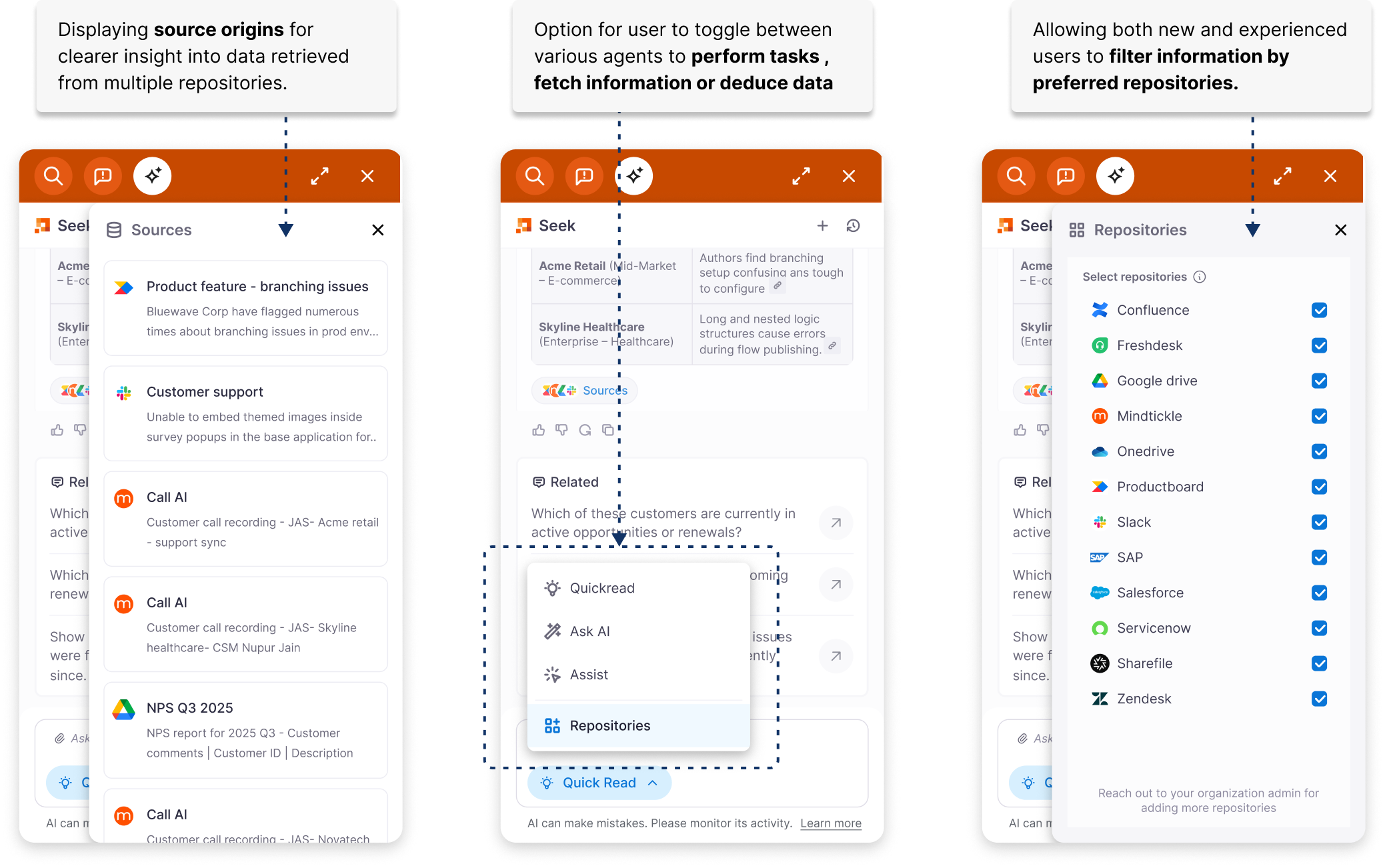
  • Responses clearly surface source references and data recency, helping users understand where information comes from.

  • Trust is reinforced through consistency of answers across similar queries, reducing confusion and increasing confidence in repeated use.

  • Perceived accuracy markers, such as response speed, freshness of data, and feedback validation, help users understand reliability at a glance.

  • Users can go deeper into sources or supporting content before acting, rather than being forced to trust the summary alone.

Validating the strategy: the triage effect

While most platforms in the information space compete to deliver increasingly powerful conversational AI experiences, our core question was different:
The problem wasn’t access to information - it was access to the right information, in context, within the flow of work.

We began by testing this hypothesis with a design partner in the insurance domain. Underwriters relied on scattered SharePoint documents and Excel sheets mapped to IBC codes , critical information, but fragmented and manual. There was no AI, no automation, just disconnected repositories that required users to leave their workflow, search precisely, and interpret dense documentation.

Instead of asking users to craft better queries, we surfaced the relevant information directly within their workflow exactly where underwriting decisions were being made. The impact was immediate. What was previously an upstream bottleneck, often error-prone and time-consuming became a contextual, one-click reference point. A process that typically took 2–3 business days to draft an insurance detail for an adjuster request was reduced to under a day, with higher confidence and fewer errors.

This was executed as a design partner workshop to validate whether contextual surfacing truly improved outcomes before investing in a full-feature build. It worked.

Designing by influence: not just executing experiences

The success with the insurance underwriters became a strong proof point. It gave us the leverage to align leadership and business stakeholders on expanding Quickread beyond the HUB widget and positioning it as a contextual modal on the customers application.

This validation signaled that Quickread’s real strength was not as a standalone AI tool, but as an AI-powered assistant embedded in the flow of work.

We moved forward with that direction and so evolved Quickread as below.

Quickread 2023

Quickread 2025

Anatomy of quickread: function, form, experience

#Functionalities - focusing on building context, multi turn interactions and trust with users.

#Form - Multi-modal form embedded within the user’s workflow, adapting to the context of the application through modals, overlay panels, and stacked side views.

#Experience - From.push/ pull information to a conversational experience in the context of users workflow.

#Quickread agent - Quickread evolved into a core component of Whatfix AI, forming the conversational layer for premium users of Whatfix Seek — the agentic AI platform.

The impact: Adoption, confidence, and learnings

Following the evolution of Quickread into a contextual, AI-enabled tool, enablement reached an all-time high of 379 enterprise tenants across 233 customers. Adoption steadily increased to 19% month-over-month by mid-Q4, reflecting stronger engagement within the flow of work. Alongside quantitative growth, qualitative feedback from customers also improved significantly, with users reporting greater confidence in the accuracy and relevance of Quickread’s responses.

There were clear wins and important learnings. Embedding Quickread directly within the flow of work , with a seamless pathway to Whatfix’s agentic AI capabilities, significantly improved user confidence in both the AI experience and the broader product ecosystem. Customers validated this shift, with one noting, “I can definitely 100% validate that right now in all our conversations and engagement - this is spot on.”

At the same time, we encountered friction around data connectivity. Several customers expressed fatigue in integrating and maintaining multiple data repositories within Whatfix systems. The perceived setup effort, coupled with ongoing governance and data-mapping concerns, created hesitation for some teams, reinforcing the need to further simplify onboarding and reduce integration overhead.

Looking forward: to improve one step each day

These learnings clarified the path forward. Admin controls and screen intelligence needs to be optimised for AI readiness, reducing the gap between contextual understanding and response delivery.

The integration experience across applications and custom repositories needs to be simplified to lower setup fatigue and one click delivery for admins. A stronger system for syncing and managing updated information is essential to maintain accuracy at scale. Finally, supporting customers’ preferred LLMs, including selective on-prem options, will ensure the flexibility and governance, enterprises expect.

But beyond features and infrastructure, this journey reinforced something deeper. Building AI systems for enterprise isn’t about making it more powerful but more about making it seamless with the system.